
Member feature · Live on iPhone
Apple Health sync: your iPhone and Apple Watch data, explained
Your iPhone and Apple Watch already count steps, sleep and heart rate. VHT brings that data into one health record and asks ECHNA, its AI health assistant, to explain what the trends mean for you, next to your conditions, medications and goals.
- You pick which Apple Health categories to share, and can change them later
- Syncs on its own when you open the app, plus a daily catch-up
- Brings in 180 days of history on the free Basic plan, up to five years on paid plans
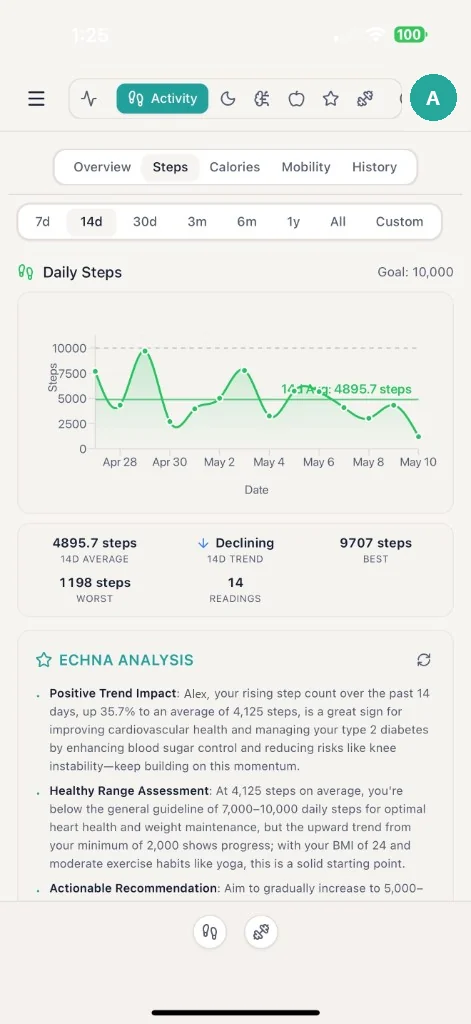
What VHT reads from Apple Health
Activity (steps, active energy, distance, flights climbed, exercise and stand time), workouts, heart rate, resting heart rate and heart rate variability, blood pressure, blood oxygen, blood glucose, weight and body composition, sleep stages, mindful minutes, respiratory readings and cycle tracking. On iOS 16.4 or later it can also read the medications you track in the Health app. Data from an Apple Watch or another device that writes to Apple Health comes along with it.
Charts and plain-language analysis
Each metric gets a chart with your average, trend, best and lowest day over 7 days, 14 days, 30 days, months or all time. Below the chart, ECHNA writes a short analysis that reads the numbers against your own profile: your age, conditions and goals, not a generic average.
It feeds your Health Index and goals
Synced data counts toward the Lifestyle and Biometrics pillars of your Health Index and toward goals such as a daily step or sleep target, so progress updates without typing anything in.
Ask ECHNA about it
Ask “Why has my resting heart rate gone up?” or “How did I sleep this month?” and ECHNA answers from your recent synced history, by text or by voice. She explains and suggests next steps; she does not diagnose.
On Android: Health Connect
The Android app syncs from Health Connect into the same record. It is in testing on Google Play right now. On the web, you see the Apple Health and Android data from your last phone sync.
How to connect Apple Health
- Install VHT on your iPhone and sign in.
- Go to your health data settings and choose to connect Apple Health.
- In the Apple Health permission sheet, turn on the categories you want to share.
- VHT brings in the last 180 days, then keeps syncing. On a paid plan you can extend the history up to five years in settings.
Good to know
- Apple Health only runs on iPhone, so the sync needs the VHT iPhone app. The web shows data from your last phone sync.
- If you log a value by hand for a day, your entry wins over the synced one for that day.
- A heart rate or rhythm notification from your watch is not a diagnosis. Talk to a clinician about it.
- You can turn off any category in the Health app at any time.
Apple Health sync: common questions
Which app can read my Apple Health data and explain it?
VHT reads the Apple Health categories you allow and shows them as charts with an ECHNA analysis under each one. You can also ask ECHNA questions about your data in chat or by voice.
Does it work with Apple Watch?
Yes. Apple Watch writes to Apple Health, and VHT reads from Apple Health, so steps, heart rate, workouts, sleep and other watch data come through.
How often does it sync?
When you open the app and the data is more than 30 minutes old, once a day, through background updates for some data types, and whenever you tap Refresh.
Can I import my older Apple Health history?
Yes. The first sync covers 180 days, which is what the free Basic plan includes. On a paid plan you can extend it in settings to one, two or five years, and pause or resume the import.
Is there an Android version?
Yes. The Android app syncs from Health Connect and is in testing on Google Play.
Can I control what VHT sees?
Yes. You choose the categories in the Apple Health permission sheet, and you can add or remove them at any time in the Health app.
Put your Apple Health data to work
Join the beta to connect Apple Health and get ECHNA’s explanations of your own trends. The beta members we invite have Premium during the beta.